
Steal My AI Adoption Project Schedule (.mpp)
I’m giving you the AI adoption project schedule my PMs start with.
Not a framework. Not a maturity curve. A real Microsoft Project plan — with durations, dependencies, owners, and a visible critical path driving the adoption timeline.
Most AI adoption plans don’t have any of that. They have swim lanes and color-coded phases and a lot of optimistic arrows. What they don’t have is a schedule a PM can actually manage.
This one does. You can load the file, review the Gantt, follow the dependencies, and extend it for your own Microsoft 365 organization. This is the starting point we use with every AI adoption engagement before adding deeper detail.
High‑level Gantt with critical path highlighted
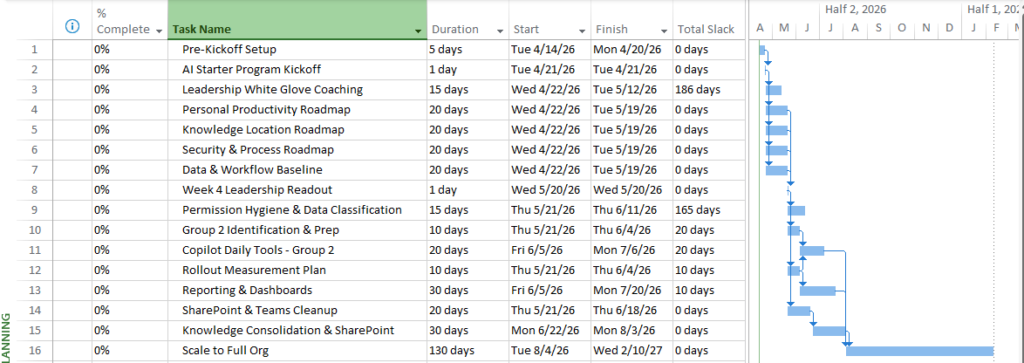
It will not look like a traditional AI roadmap — or even a traditional project plan. That’s intentional.
Why This Schedule Looks Different
Most AI adoption plans fail for a simple reason: they assume adoption happens in a straight line.
One pilot. Then governance. Then training. Then scale.
In practice, that stair‑step approach creates delays, risk, and stalled momentum. We’ve learned the hard way that AI adoption behaves much more like a PMO adoption — parallel, incremental, and confidence‑driven — not a sequential technical rollout.
This schedule is designed around that reality.
(If you’re interested in the full thinking behind this, I wrote about why AI adoption looks more like a PMO adoption than a tech rollout here: [Link to related article])
Our Approach Starts with a Small Group — by Design
Our AI adoption approach intentionally starts with a small group — typically 10–12 participants — through our AI Starter Program.
This lets organizations explore AI safely and deliberately without forcing everyone to stop what they’re doing and “learn AI” all at once.
Normal workflows continue. Daily routines aren’t disrupted. Adoption happens alongside real work — not instead of it.
Running adoption in this way allows us to:
- Reduce organizational and security risk
- Limit unintended data or policy exposure
- Protect critical business workflows
- Learn what actually works before scaling
This isn’t hesitation. It’s a risk‑averse, execution‑focused approach designed to build confidence early.
Want to learn more about our approach and the AI Starter Program? [Link Placeholder: AI Starter Program landing page]
If you’re still working out who should own the AI adoption on your side, I wrote about the four ownership tiers and why IT probably shouldn’t be the answer — [Link: AI Ownership Has a Roadmap].
Parallel Tracks: Why We Don’t Sequence Adoption
The schedule is structured around three parallel vertical tracks that all begin on Day 1:
- Personal Productivity
- Knowledge & Team
- Data & Workflow
Two additional workstreams — Security & Process and Reporting & Measurement — run horizontally across all three tracks simultaneously. They aren’t phases or milestones. They start on Day 1 and never stop.
AI Adoption Framework
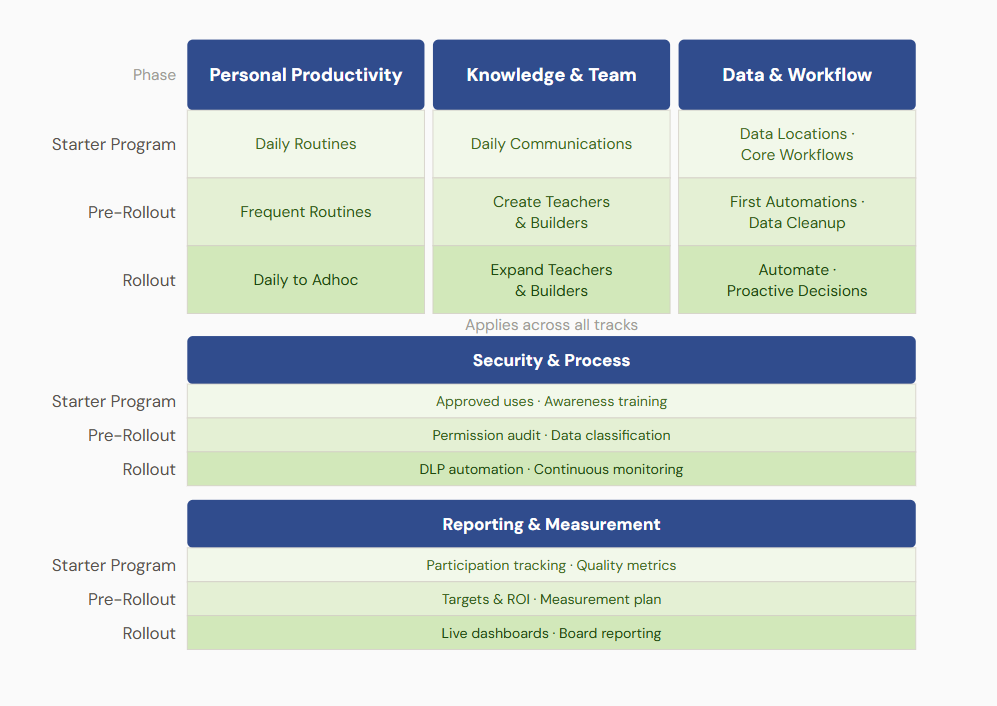
These tracks are not sequential phases. They represent different streams of work that must start early — even though they mature at different speeds.
Parallel doesn’t mean everything is built at once. It means discovery starts early so planning is accurate.
Personal Productivity
This is where most users feel AI first:
- Copilot in Outlook, Teams, Word, Excel, and SharePoint
- Daily routines and repeatable productivity wins
This track often shows value quickly, but it also informs reporting, measurement, and leadership confidence.
Knowledge & Team
This track focuses on how teams work together:
- Shared communication practices
- Meeting summaries and channel recaps
- Knowledge consolidation in Teams and SharePoint
- Early internal Teachers and Builders
Adoption scales through people — not policies. This track creates momentum organically.
If you want to go deeper on how to identify, recognize, and keep those people, I wrote about why incentivizing your early AI adopters is the budget shift hiding in plain sight — [Link: Why You Should Incentivize Your AI-Enabled Employees].
Data & Workflow
This track is why parallel execution matters.
Even though large‑scale automation may come later, discovery starts during the AI Starter Program. We work with IT early to “peek under the hood” and understand:
- Where data actually lives
- What Power Automate flows and Power Apps already exist
- What external systems and services are connected
- What cleanup, classification, or guardrails will be required before scale
We do this early not to automate early, but so the roadmap produced at the end of the Starter Program is grounded in reality — not assumptions.
Security & Process
Security runs as a horizontal band across all three tracks from Day 1 — not as a separate phase that precedes or follows adoption work:
- Approved use guidance
- Awareness and guardrails
- Permission hygiene and data classification
- Automation and continuous monitoring later
Putting security alongside adoption builds confidence instead of slowing momentum.
Reporting & Measurement
Like Security & Process, Reporting & Measurement runs horizontally across all three tracks. If adoption isn’t visible, it’s impossible to defend or scale.
This horizontal ensures:
- Participation is measurable
- Quality signals appear early
- Leaders can point to concrete progress
- ROI conversations are grounded in data
Reporting isn’t an afterthought. It’s how organizations earn the right to expand adoption.
Parallel Doesn’t Mean Disruptive
Because adoption starts with a small group, the broader organization doesn’t need to change immediately.
Work continues. Deadlines remain intact. Risk stays contained.
Learning happens safely, iteratively, and intentionally — without forcing disruption across the enterprise.
This is how adoption moves faster without creating friction.
Why a Traditional WBS Breaks Down
We originally tried to model this AI adoption using a traditional Work Breakdown Structure.
On paper, it looked fine.
The problems didn’t surface until we grouped the schedule by Track and then by Phase — and realized some Pre‑Rollout work simply wasn’t there.
The work wasn’t missing because it was forgotten. It was missing because hierarchy can’t represent vertical tracks crossing horizontal phases.
That’s when the structure failed.
The Flat Schedule Approach
Instead of burying logic inside a deep hierarchy, the schedule stays intentionally flat.
Every task lives at the same level. Meaning comes from attributes — not structure.
Instead of a WBS, we use:
- Track (Program Area)
- Phase
- Owner
[Image Placeholder: Schedule view showing Track / Phase / Owner columns]
This keeps the Gantt readable, the critical path visible, and the schedule honest.
Built‑In Gap Analysis
This structure turns the schedule into an analysis tool.
When we group by Track and Phase:
- Empty groupings expose missing work
- Pre‑Rollout gaps surface immediately
- Security or data readiness issues can’t hide
The schedule audits itself.
When new work is identified, we add a task, assign its Track and Phase, set dependencies — and it automatically appears in the right place.
No restructuring. No re‑parenting. No WBS surgery.
This Is the Starting Schedule
This is the schedule my PMs start with for AI adoption.
The critical path is visible from day one. Structure comes before detail. Detail follows discovery.
We’ve learned this approach the hard way — through failed pilots, stalled initiatives, and plans that looked polished but didn’t survive reality.
There isn’t time for organizations to repeat those mistakes.
Companies adopting AI today aren’t looking for another learning cycle. They want a competitive advantage — fast.
The organizations moving on this now aren’t just getting more efficient — they’re getting harder to compete against. I wrote about what that looks like and why the window is narrower than most people think — [Link: Organizations Adopting AI Are Becoming Dangerous Competitors].
This schedule exists to put you on the right side of that line.
What’s Included in the Download
The download includes the exact starter schedule my PMs use — available in two formats so you can work the way you already do.
- Microsoft Project file (.mpp) This is the primary version. It includes:
- Task durations and dependencies
- A visible critical path
- Custom fields for Track, Phase, and Owner
- A flat structure that supports gap analysis through grouping
- CSV version of the same schedule This is included for teams that:
- Don’t use Microsoft Project yet
- Prefer to start in Excel, Smartsheet, or another planning tool
- Want to review or adapt the structure before importing it elsewhere
Both versions contain the same starting logic and structure. The difference is simply how you choose to work with it.
This is not meant to be a finished, one‑size‑fits‑all plan. It’s the starting schedule — the one that gives PMs a real critical path, exposes gaps early, and evolves as discovery happens during the AI Starter Program.
Below to: Download Your AI Adoption Project Schedule (.mpp + .xlsx)]
**TIP** Check your spam folder ; )
Download Your Free AI Project Schedule Below
Send download link to: